In this article
A current card balance is not a paycheck receipt. To check a pay event, compare the amount directed to that destination with the deposit entries for that same event.
Start with one employer and one statement. Keep other pay periods, reimbursements and deposits outside the comparison until you know they belong. The aim is to produce an answerable question, not to certify that payroll was calculated correctly.
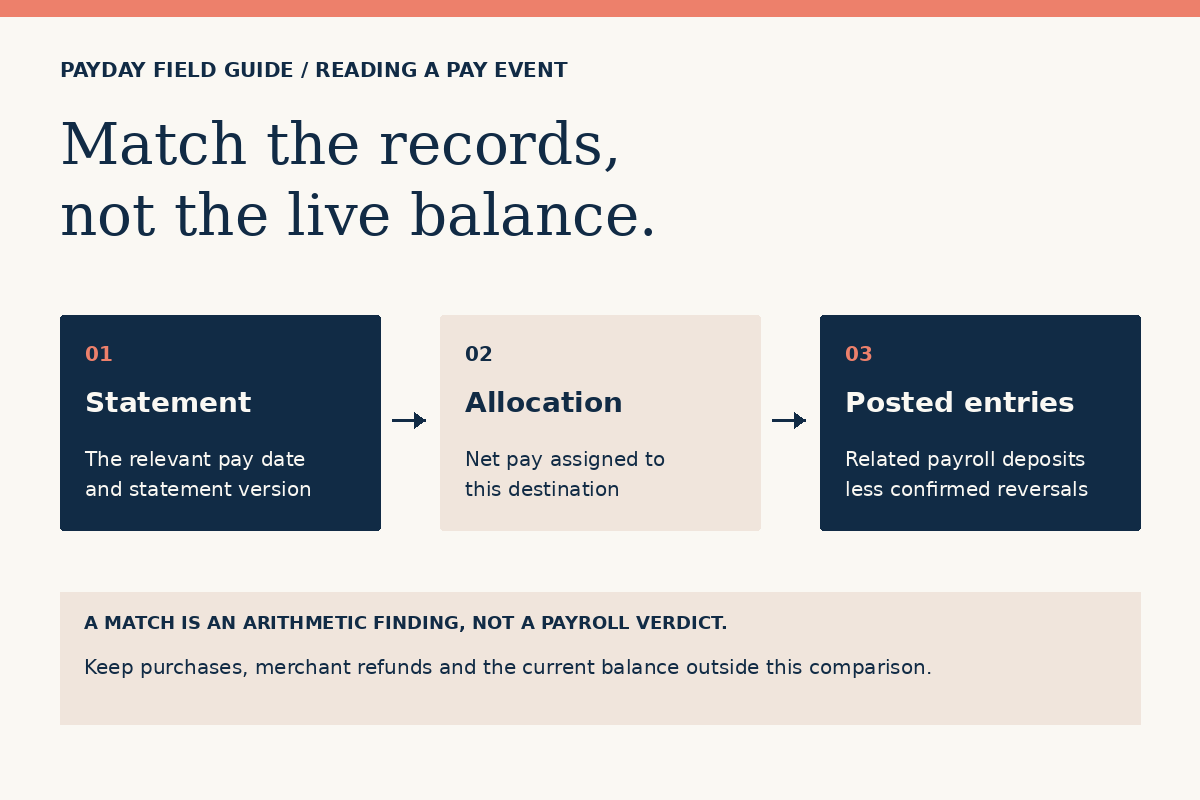
Name the event before adding amounts
Write down the pay date shown on the statement, the work period it covers and whether it is an original statement or a correction. Then locate the deposit entry using the official account history available to you. Record the entry’s date, description and posted status in your own private notes. A pending item is not interchangeable with a posted one.
Matching on amount alone can be misleading. Two consecutive paychecks may have the same net amount; a reimbursement may happen to match a wage payment; a correction may arrive separately. The identifying details are the reason for grouping entries. If those details do not line up, ask payroll to identify the payment before combining it with another.
Use the amount assigned to this destination
The CFPB’s paycheck education distinguishes earnings and deductions from take-home pay. For this matching exercise, begin with the statement’s net-pay figure, not gross earnings. If an authorized split sends some net pay elsewhere, subtract only the portion documented for those other destinations. Do not subtract taxes or deductions a second time when they are already included in net pay.
A statement shows $920 net pay. The confirmed allocation sends $120 to another destination. The expected amount for the card is $800. Two posted payroll entries of $650 and $150 match that $800 total, if payroll confirms both belong to this pay event. A current balance of $735 does not change that comparison.
Keep spending outside the equation
Purchases, withdrawals, merchant refunds, account fees and a starting balance affect an account in other ways. They are not additional wages and should not be mixed into a payroll-deposit comparison. Do not use a lower live balance as proof of underpayment without inspecting the transaction history.
A documented payroll reversal needs special care. If an entry is actually reversed, compare the remaining net deposits with the relevant statement version. Do not label an unfamiliar debit a payroll reversal merely to make the numbers match. The worksheet accepts reversals only as an arithmetic input; it cannot identify an entry for you.
Read the result as a finding, not a verdict
A zero difference says that the selected amounts match under the assumptions you entered. It does not establish the right hourly rate, correct deductions, timely payment or legal compliance. A nonzero difference says that more explanation is needed; it does not identify who made a mistake.
Use the local pay-record worksheet for a simple comparison with up to two posted deposits. Use fictional or rounded example amounts if you are on a shared device. The tool does not accept uploads, access a card account or save the amounts. For more complex cases, keep a separate private list rather than forcing several unrelated entries into two fields.
Turn the comparison into a short question
A useful next message names the pay date, the stated allocation, the posted amount and the unresolved difference. Ask payroll to confirm the payment instruction and any correction, using its approved secure channel for private details. If payroll confirms an instruction but the account record still needs investigation, ask the card provider through the verified route. See which contact handles which problem.
Sources and scope
Official public sources checked October 21, 2026. Checklists, examples and record-organizing methods are original editorial guidance. They do not establish your program terms, payment status or legal rights in an individual case.
- CFPB: examining the elements of a paycheck
Educational background on earnings, deductions and the difference between gross and net pay. It does not explain any particular employer statement.
- Corpay Prepaid: current brand and cardholder information
The public page announces the change from Fintwist to Corpay Prepaid and directs readers to their cardholder agreement and fee schedule. It is not evidence of any individual employer setup.